SHOTVERO — AI SCREENSHOT ASSISTANT

Capture your screen.
Make your point.

A screenshot extension you add to Chrome or Edge.
Capture, mark up, save and share — all inside your browser.

Free. No credit card required. · Chrome / Edge extension · English / 日本語

Capture, edit and read text on your device

No server holds your screenshots

Sharing goes device to device

HOW TO USE

Four steps, start to finish.

From pinning the icon to sharing the result. New here? This is all you need.

  1. 01

    Pin the icon

    Open the puzzle-shaped extensions menu at the top right of your browser and pin Shotvero to the toolbar, ready for the next page worth keeping.

  2. 02

    Choose a capture from the menu

    Click the icon on the page you want to capture. The menu opens with the visible area, the whole page, a selected area, and more.

  3. 03

    Make your point in the editor

    Every capture opens the editor. Add text and arrows, cover what should stay private, and crop to the part that matters.

  4. 04

    Save, print, or share

    Export PNG, JPEG or PDF, print it, copy it to the clipboard, or create an encrypted share link that goes straight to the other device.

Illustration of the feature workflow

01 / CAPTURE

Just the part
you need.

An interesting page, a moment in a video, a post to revisit. Capture what matters, right from your browser.

FREE

The view, or the whole page

Press the toolbar icon and choose. A long page scrolls on its own and arrives as one tall image.

FREE

Only the area you outline

Drag to select the part you want. Move to the edge of the window and the page scrolls, so the selection can continue past the visible area.

FREE

One frame from a video

Turn the frame on screen into an image and open it in the editor. On YouTube, a button in the player does the same.

A post from X or Instagram, with its link

Choose a post and Shotvero captures that post alone, with the author, its URL and the capture time printed underneath.

YouTubeXInstagram

Supported videos and posts only. Site structure, content protection, and browser restrictions can prevent capture.

Shotvero · capture
IDEAS & INSPIRATION

An idea worth keeping

Save the part that caught your eye.

Full-page capture
A frame from a video00:12
Illustration of the feature workflow
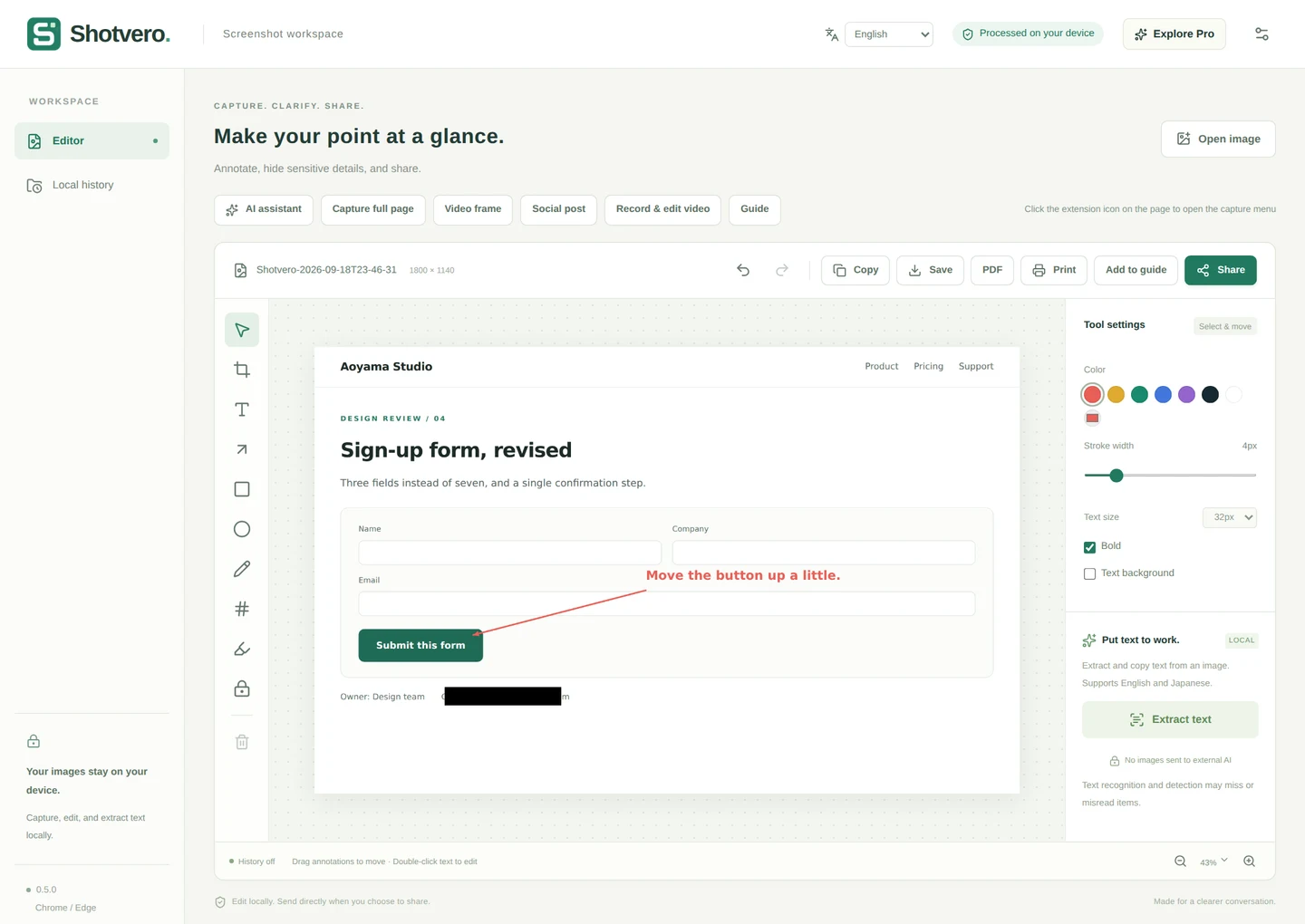
Shotvero image editor with text, arrow, redaction, OCR, save, and share tools.
  1. Pick a tool: text, arrow, redaction
  2. Mark up the image, or hide a detail
  3. Save, print or share it
The actual editing interface. Appearance and features may change as the extension is updated.
02 / CLARIFY

Make “right here”
easy to see.

An arrow or a few words can save a long explanation. Hide what should stay private behind a mosaic or solid redaction, and resize or recolour anything after you have drawn it.

Text, arrows, numbersBoxes, circles, highlightsMosaic and solid redaction
LOCAL AI

AI that runs on your own device.

Shotvero reads the text inside an image (OCR) in English and Japanese, free of charge, and the text is yours to copy. Pro adds summaries, English⇄Japanese translation and guide drafts. Every one of them runs on your device, so the image never leaves it.

Summaries and translation need a compatible PC and current Chrome. The first run downloads a model, which uses network data and disk space. Always review generated text before you share it.

03 / SHOTVERO PRO

When a picture needs
a little more story.

Explain an interaction, capture a gaming moment, or hand a process to your team. Add video and PDF guides to your toolkit.

See Pro pricing

Record a little. Show what matters.

Select a tab, window, or screen and record for up to 10 minutes. Import and trim video, or extract a still frame for your next image.

Up to 10 minutes / 512 MiB. Audio depends on your OS and browser. No always-on recording or instant replay.

Turn screenshots into a useful guide.

Arrange images, add a heading and instructions, then export a PDF. Bring up to 20 screenshots together in one clear document.

Illustration of the feature workflow

MADE FOR YOUR EVERYDAY

For work. And everything after.

Reviews and feedback

Point to the change with an arrow so everyone sees the same thing.

Gaming and video moments

Start a short recording when you need it. Turn a frame into an image and add your take.

Research and how-tos

Keep a page or post as a visual note. Use Pro to turn multiple screens into a PDF guide.

04 / PRIVATE SHARING

From your screen.
To their device.

Encrypt your file and transfer it directly to the other browser, without storing it on a file-sharing server.

FREE

Share past screenshots in one click.

No need to capture it again. For images still in your on-device library, click Share to create a fresh link and QR code.

For a group too, the sender keeps their tab open while people receive. Some networks cannot establish a direct connection; save the file if needed.

SERVERLESS & PRIVATE BY DESIGN

After the capture, it stays on your device.

Your images never reach an AI server.

Text recognition and image editing run inside the browser. Shotvero has no feature that sends your screenshots to train an external AI.

No screenshot library on our side.

When you share, the encrypted file goes straight to the other browser. A server helps the two connect, but never stores the file.

Clear about the data we do receive.

A login email, your subscription record, and connection details that prevent abuse are what running the service needs. Our policy explains each one.

Read how your data is handled
SIMPLE PLANS

Start with the basics. Make room for more.

Capturing and marking up is free. Extension version 0.6+ includes a card-free, seven-day Pro trial.

Shotvero Free

FREE

For everyday screenshots

$0Free

No credit card for the core features

For everyday captures and clearer conversations.

  • Visible-area, selected-area and full-page capture
  • Selections that keep scrolling past the visible area
  • A capture menu with keyboard shortcuts
  • One frame lifted out of a playing video
  • A capture button inside the YouTube player
  • Text, arrows, shapes, mosaic and solid redaction
  • Reads the text inside an image (English and Japanese, on your device)
  • PNG / JPEG export, single-image PDF, and printing
  • Copy to the clipboard as soon as you capture
  • The page title and URL kept with each capture, on your device
  • Captures saved on your device, shared from the library in one click
  • Search the library by page, URL or extracted text
  • P2P image sharing with a phone QR code: multiple images to one recipient
Add to Chrome (free)

No server holds your screenshots

Shotvero Pro

PRO

For video and documentation

$5USD / month

Or US$50 / year, billed annually

For records, guides and everything you hand to someone else.

  • Everything in Free
  • 7-day free trial and up to 3 browser registrations (version 0.6+)
  • Automatic guides from clicks, with numbered screenshots (up to 20 steps, version 0.6+)
  • Captioned GIFs from video (up to 20 seconds, processed locally, version 0.6+)
  • AI summaries, translation and guide drafts, all on your device (compatible PC / Chrome required)
  • X and Instagram posts captured with the link, author and capture time
  • Every open tab captured into one PDF
  • Recording up to 10 minutes, video import and trimming
  • Extract still frames from video
  • PDF export and screenshot guides
  • P2P group sharing with up to 8 recipients
  • 30-minute or 1-hour share links (version 0.6.1+)
Subscribe to Pro

Save US$10 compared with 12 monthly payments.

You can also check your subscription, change plan, or cancel from your account page. Open your account

Monthly and annual plans renew automatically. Cancel the next renewal at any time.

Pro costs US$5 per month or US$50 per year, including applicable service taxes. You select the billing currency and period before checkout. Card payments are processed through Stripe. Subscribe from Pro & account in the extension, or from your account page. Your internet provider or card issuer may charge separate connection, foreign exchange or international transaction fees.

Cancellation & refunds · Commerce disclosure

AVAILABLE NOW · WINDOWS / MACOS

Start in the browser you already use.

Available on the Chrome Web Store for Chrome and Edge on Windows and macOS, with English and Japanese interfaces.

Standalone Windows and Mac apps are planned for the future.

GOOD TO KNOW

A few things,
up front.

Supported environments, possibilities, and practical limits.

Contact
Is there a free Pro trial?

Extension version 0.6+ offers a one-time seven-day trial after email verification and an explicit start. No card is needed and it never automatically charges. You return to Free afterwards. A separate paid purchase starts billing immediately.

How many devices can I use?

Up to three browser registrations for your own use. Different browsers or profiles count separately. Remove unused registrations from your account page. Older 0.5 releases count each login session as a registration.

Can I receive a file on my phone?

Scan the share-screen QR code with your camera and receive in the browser; no app is required. Keep both screens open. Links last 10 minutes on Free; Pro offers 30 minutes or 1 hour (version 0.6.1+). Changing the duration creates a new link and QR. A single-recipient link also ends once received. Some networks do not allow a direct connection.

Can I install Shotvero now?

Yes. Shotvero is published on the Chrome Web Store. Use “Add to Chrome” on this page to install it; the core features are free and need no credit card. Subscribe to Pro from Pro & account in the extension, or from your account page.

Does it work on Windows and Mac?

The first release is an extension for desktop Chrome and Edge, intended for supported browsers on Windows and macOS. Standalone Windows and Mac apps are a future plan and are not included in the current paid plan.

Can it capture everything on YouTube, X, and Instagram?

It works with supported videos and posts visible in your browser. Site changes, DRM, and browser restrictions can prevent capture. Shotvero is not affiliated with these platforms. You are responsible for respecting copyright and each platform’s terms.

What does serverless mean here? Where are my screenshots stored?

Capture, editing and text recognition run inside your browser, and nothing is uploaded. We do not host a screenshot library. Downloaded files stay on your disk; extension history prunes older entries at 30 days, 200 items, or 200 MiB. Files live on your device: your downloads folder, and the library that keeps your captures here. Only when you share does a serverless platform help the two browsers connect, while the file itself goes encrypted, straight to the other device.

Does it work offline?

Capturing, annotating, redacting, saving, printing, PDF export and text recognition all work offline. Sharing needs a connection to reach the other person, and generative AI needs one the first time it downloads a model. Pro features work offline for up to 24 hours after validation, then require a connection to check access.

Are PDF export and printing free?

Yes. Saving one screenshot as a PDF and printing are Free features. Multi-page guide PDFs and video-note PDFs are part of Pro.

Can I turn all my open tabs into one PDF?

Yes. Pro’s “Capture every tab as a PDF” captures the tabs in that window in order and collects them into one guide you can export as a single PDF (up to 20 tabs). Permission to access all sites is requested only for that action and can be withdrawn automatically afterwards; a normal install never asks for it.

Can I change the capture shortcuts?

Yes. The defaults are Alt+Shift+S for the visible area, Alt+Shift+F for the whole page, Alt+Shift+4 for a selected area, and Alt+Shift+G to add a step (Pro). Reassign them in your browser’s extension shortcut settings, where you can also set a key that opens the capture menu. The menu shows the current keys next to each item.

Can I get a capture button inside YouTube?

Yes, and it is free. Turn on “Show a capture button on YouTube videos” in the extension settings. Shotvero confirms access to YouTube and adds a capture button to the player, or a floating button over the video when the player has no control bar. Pressing it turns the frame on screen into an image. Turning the setting off removes both the button and the permission.

Can I capture an X post with its link?

Yes. Pro’s “Capture a post with its link” takes a post on X or Instagram and builds one image with the author, the post’s URL and the capture time printed underneath, so the source travels with the screenshot. Turn the stamp off in settings if you would rather keep the image bare.

Can I record gameplay?

Pro recording lets you select a tab, window, or screen supported by the browser, up to 10 minutes and 512 MiB. There is no always-on recording or instant replay buffer. Some games and protected screens cannot be recorded. Audio availability depends on your OS and browser.

What is P2P sharing?

P2P (peer-to-peer) means sending a file directly from one device to another. Shotvero encrypts the transfer without storing the image or video on our servers. A server helps the browsers connect. Both people must be online and keep their sharing pages open until the transfer finishes.

Can someone open a P2P link later?

Both sender and recipient need to be online at the same time. A link lasts 10 minutes on Free. Pro also offers 30 minutes or 1 hour (version 0.6.1+); changing the duration creates a new link and QR. A share expires at its chosen time and goes either to one person or, as a group share, to up to eight people from the same link. Select several images in your library and they travel as one link, which the other side can save one by one. Some networks cannot establish a direct connection. You can save the file and use another sharing method.

Will AI catch every sensitive detail?

No. OCR and detection can make mistakes or miss information. Review the whole image and cover sensitive areas before sharing. OCR supports English and Japanese. Pro summaries, translations and guide drafts also require review. Sensitive-information candidates use text patterns, not an AI guarantee.

Does the AI assistant work on every PC?

A supported PC, current Chrome and model setup are required. Image, text and translation support can differ. Check in AI assistant before subscribing. Chrome downloads models from Google on first use; your images and text are processed on-device. Pro does not make an unsupported device compatible.

What happens when I cancel Pro?

Open Pro & account in the extension, or your account page, and use the billing portal to stop the next renewal. Pro remains available through the paid period, then your account returns to Free. Uninstalling the extension does not cancel a subscription.

A clearer picture. A better conversation.

Shotvero is available on the Chrome Web Store. Add it for free and start today. For product questions or business inquiries, the contact page is the place to start.